
Artificial intelligence applications are evolving beyond simple question-and-answer chatbots. Modern AI systems can retrieve information from private documents, connect to external applications, call APIs, and coordinate multi-step workflows. Three concepts frequently appear in these systems: Model Context Protocol (MCP), Retrieval-Augmented Generation (RAG), and AI Agents.
Although developers often discuss them together, they solve different technical problems.
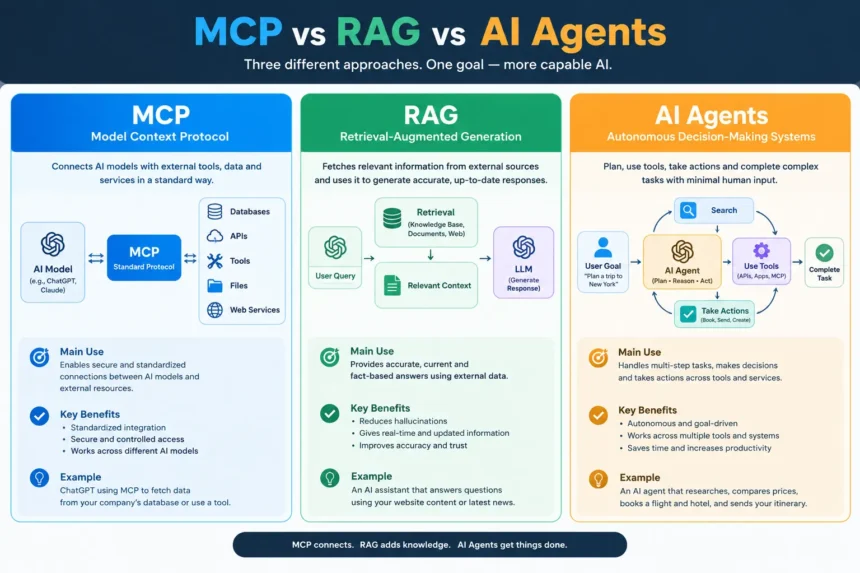
MCP standardizes how AI applications connect to external tools and resources. RAG retrieves relevant information and supplies it to a language model to improve the grounding of its responses. AI agents use models, tools, and control logic to pursue goals through one or more steps.
Understanding MCP vs RAG vs AI Agents is essential when designing reliable AI applications, enterprise assistants, customer support systems, and automated business workflows. Choosing the right architecture depends on whether an application needs better connectivity, access to external knowledge, multi-step execution, or a combination of all three.
What Is MCP (Model Context Protocol)?
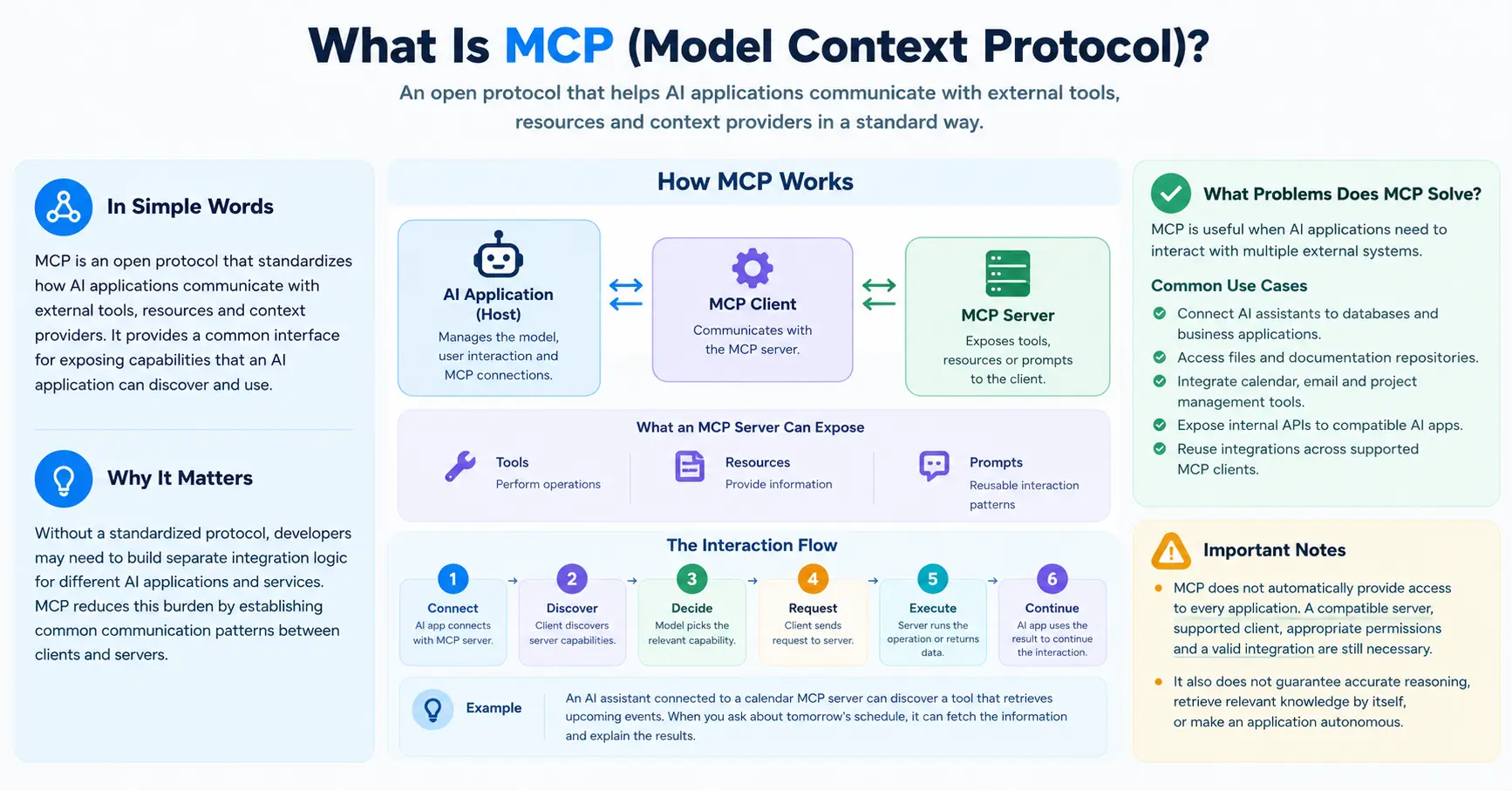
Model Context Protocol (MCP) is an open protocol that standardizes how AI applications communicate with external tools, resources, and context providers. It provides a common interface for exposing capabilities that an AI application can discover and use.
Without a standardized protocol, developers may need to build separate integration logic for different AI applications and services. MCP can reduce this integration burden by establishing common communication patterns between clients and servers.
How MCP works
An MCP-based architecture typically includes three components:
- MCP host: The AI application that coordinates the model, user interaction, and MCP connections.
- MCP client: The component inside the host that communicates with an MCP server.
- MCP server: The service that exposes tools, resources, or prompts to the client.
An MCP server may expose tools for performing operations, resources for providing information, and prompts for reusable interaction patterns.
A typical interaction follows this sequence:
- An AI application establishes a connection with an MCP server.
- The client discovers the capabilities the server exposes.
- The model or application determines which capability is relevant to the task.
- The client sends the appropriate request to the server.
- The server executes the operation or returns the requested information.
- The AI application uses the result to continue the interaction.
For example, an AI assistant connected to an MCP server for a calendar application might discover a tool that retrieves upcoming events. When the user asks about tomorrow’s schedule, the assistant can request the relevant information through that tool and explain the results.
MCP provides the communication mechanism, but the application still needs appropriate authentication, authorization, error handling, and logic for deciding when to call a tool.
What problems does MCP solve?
MCP is particularly useful when AI applications need to interact with multiple external systems.
Common use cases include:
- Connecting AI assistants to databases and business applications.
- Accessing files and documentation repositories.
- Integrating calendar, email, and project management tools.
- Exposing internal APIs to compatible AI applications.
- Reusing integrations across supported MCP clients.
MCP does not automatically provide access to every application. A compatible server, supported client, appropriate permissions, and a valid integration are still necessary.
It also does not guarantee accurate reasoning, retrieve relevant knowledge by itself, or make an application autonomous.
What Is RAG (Retrieval-Augmented Generation)?
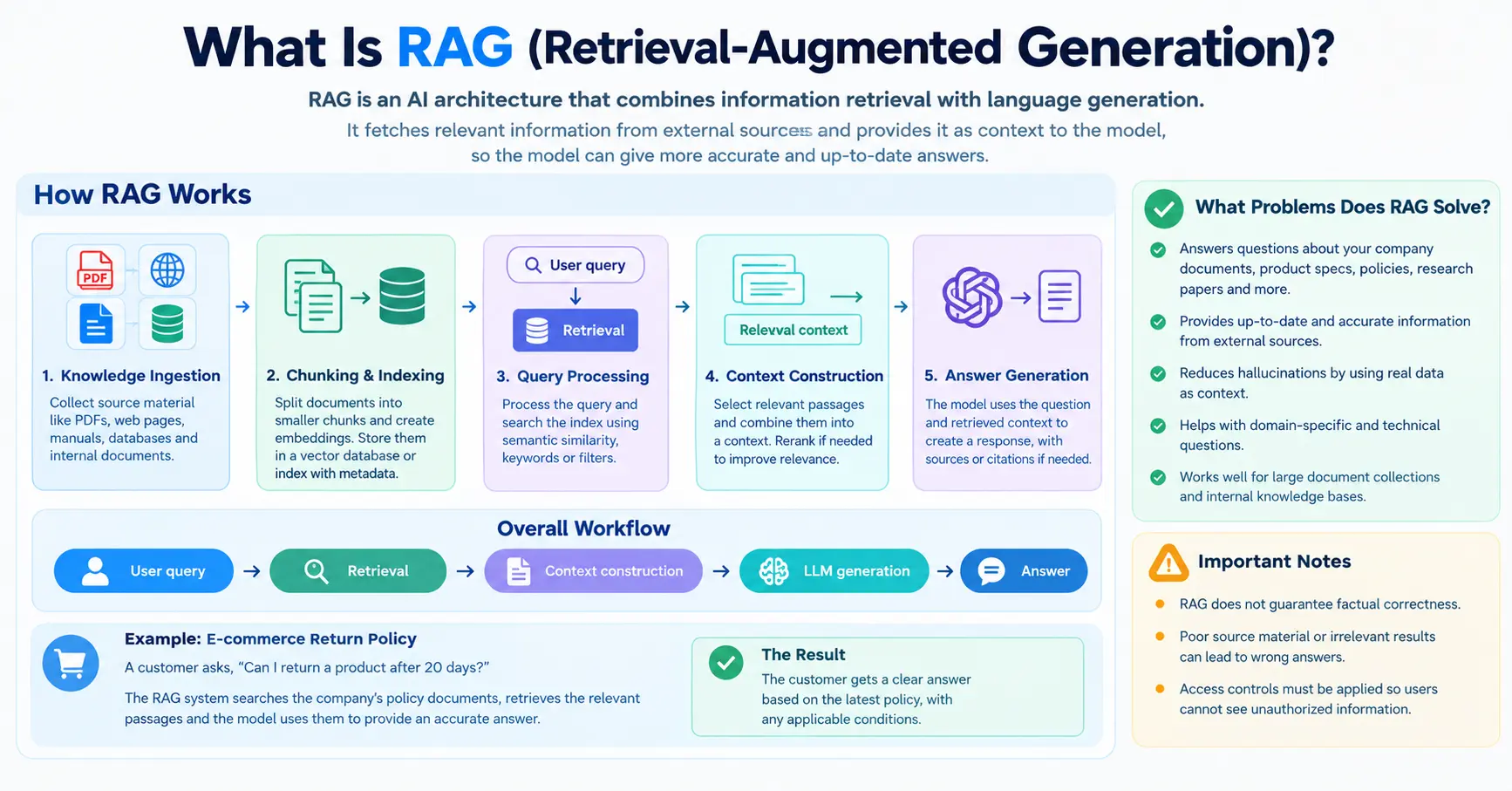
Retrieval-Augmented Generation (RAG) is an AI architecture that combines information retrieval with language generation. Instead of relying exclusively on information encoded in a model’s parameters, a RAG system retrieves relevant information from an external knowledge source and supplies it as context to the model.
This approach is useful when an application needs to answer questions about company documents, product specifications, policies, research papers, or other information that may not be included in the model’s training data.
How RAG works
A typical RAG pipeline contains several stages.
1. Knowledge ingestion
The system collects source material such as PDFs, web pages, manuals, databases, and internal documents. It extracts the relevant text and prepares it for retrieval.
2. Document chunking and indexing
Long documents are usually divided into smaller passages called chunks. These chunks may be converted into vector embeddings and stored in a vector database or another retrieval index. Depending on the application, the system can also maintain metadata and keyword indexes.
3. Query processing
When a user asks a question, the system processes the query and searches the available index. Retrieval may use semantic similarity, keyword matching, metadata filters, or a hybrid approach.
4. Context construction
The system selects relevant passages and places them into a context that is passed to the language model. Some implementations rerank retrieved passages to improve relevance before constructing the final context.
5. Answer generation
The model uses the question and retrieved context to produce a response. A well-designed system may also include citations, source references, or instructions to acknowledge when the available evidence is insufficient.
The overall workflow is:
User query → Retrieval → Context construction → LLM generation → Answer
Practical example of RAG
Consider an e-commerce company that wants to answer customer questions about its return policy.
A customer asks, “Can I return a product after 20 days?”
The RAG system searches the company’s approved policy documents and retrieves the passages describing the return window and any applicable conditions. The language model uses those passages to formulate an answer.
If the policy allows returns within 30 days, the system can explain that the customer is within the stated window, while noting any additional conditions that apply.
Without access to the relevant policy, a general-purpose language model might provide an answer based on assumptions or outdated information.
What problems does RAG solve?
RAG is particularly useful for:
- Internal knowledge assistants.
- Customer support chatbots.
- Search across large document collections.
- Question answering over technical manuals.
- Research assistants that retrieve relevant papers.
- AI systems that need access to frequently updated information.
However, RAG does not guarantee factual correctness. Poor source material, irrelevant retrieval results, missing documents, or misleading context can still produce incorrect answers. Access controls must also be applied during retrieval so users cannot obtain information they are not authorized to see.
What Are AI Agents?
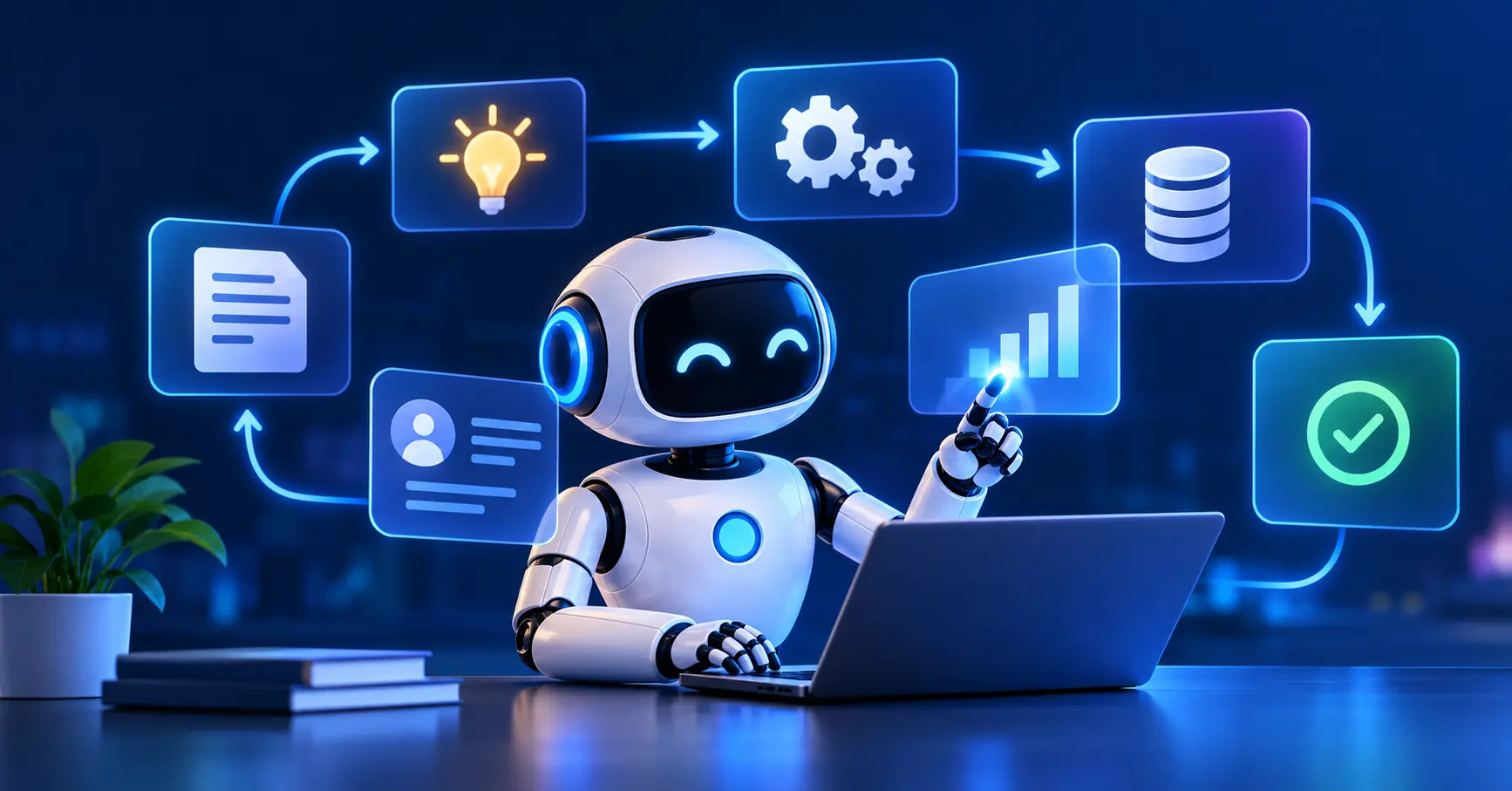
AI agents are systems designed to pursue goals by selecting actions, using tools, observing results, and deciding what to do next. They often use a large language model for reasoning or action selection, together with instructions, tool definitions, application state, and execution logic.
Unlike a simple chatbot that generates a response to each message, an agent can coordinate multiple operations to complete a task.
The level of autonomy varies. Some agents follow predefined workflows with model-assisted decisions, while others can dynamically select tools and revise their plans based on intermediate results.
How AI agents work
A tool-using agent may follow this cycle:
- Receive a goal: Interpret the user’s request and identify the desired outcome.
- Plan or select an action: Determine which step is appropriate based on the task and available capabilities.
- Execute: Call a tool, query a system, or perform an authorized operation.
- Observe: Inspect the result, including any errors or unexpected output.
- Adjust: Decide whether another step is required.
- Finish: Return the result, request clarification, or seek human approval when necessary.
Not every agent explicitly plans every step in advance. Some use short action loops, while others combine deterministic workflows with model-based decisions.
Practical example of an AI agent
Imagine a business receives new leads through a website and wants to automate its follow-up process.
A lead management agent could:
- Retrieve new leads from the CRM.
- Check which records contain sufficient contact and company information.
- Use a knowledge source to find the company’s approved products, pricing, and messaging guidelines.
- Draft personalized follow-up emails.
- Save the drafts for a sales representative to review.
- Update the CRM with the results.
- Report which leads were processed and which need attention.
With suitable permissions and safeguards, the system could also send approved messages automatically.
The important distinction is that the agent coordinates a sequence of actions toward a goal. It is not simply generating text about how the task could be completed.
Where AI agents are useful
AI agents can support:
- Lead qualification and sales operations.
- Customer support and ticket routing.
- Appointment scheduling.
- Research and report preparation.
- Multi-step data processing.
- Software development and testing assistance.
- Business process automation across connected systems.
Agents also introduce additional risks. A wrong decision can propagate through multiple steps, and an incorrectly configured tool can make unauthorized changes. Permission boundaries, logging, retry limits, approval checkpoints, and clear stopping conditions are therefore important parts of production agent design.
MCP vs RAG vs AI Agents: Key Differences
The three concepts are best understood as complementary parts of an AI architecture rather than direct competitors.
| Dimension | MCP | RAG | AI Agents |
|---|---|---|---|
| Primary purpose | Standardized connectivity | Knowledge retrieval and grounding | Goal-oriented execution |
| Main problem | How can the AI application access external capabilities? | What relevant information should inform the answer? | What actions should the system take to reach the goal? |
| Core components | MCP hosts, clients, servers, and exposed capabilities | Knowledge sources, indexes, retrieval, context construction, and LLM | Model, instructions, tools, state, and control logic |
| Typical output | Tool results, resource content, or other protocol responses | An answer informed by retrieved evidence | A completed task, intermediate results, or a decision |
| Common use case | Connecting an assistant to external systems | Answering questions about company documents | Coordinating a multi-step business workflow |
| Requires the other two? | No | No | No, although integrations and retrieval can expand its capabilities |
MCP vs RAG
MCP and RAG can both involve external information, but they address different concerns.
RAG describes a retrieval-and-generation architecture. It determines how relevant information can be found and supplied to a language model.
MCP defines a standardized way for AI applications to communicate with external capabilities. An MCP server could expose a search tool that a RAG application uses, but MCP itself is not a retrieval algorithm or a RAG pipeline.
For example, a document assistant might use an MCP server to access a document search service. The search service retrieves relevant passages, and the RAG pipeline uses those passages to generate a grounded answer.
RAG vs AI Agents
RAG focuses on retrieving relevant information and using it during generation. An AI agent focuses on making decisions and coordinating actions toward a goal.
A RAG application can answer a question about an invoice policy without taking any further action. An agent could retrieve that same policy, inspect an invoice, identify a potential discrepancy, and prepare a report.
Agents can use RAG as one of their capabilities, but retrieval alone does not make a system an agent.
MCP vs AI Agents
MCP provides a communication protocol; an AI agent provides goal-oriented control logic.
An agent might use MCP to access a calendar, CRM, database, or email service. However, an agent can also use direct API calls, software libraries, or other integrations without MCP.
MCP does not decide which actions are appropriate or determine whether the overall task is complete. Those responsibilities belong to the agent and its surrounding application logic.
How MCP, RAG, and AI Agents Work Together
A modern AI application can combine all three to deliver more capable functionality.
Consider an AI assistant that manages guest-post inquiries for a technology publication.
The application receives an email from a potential publishing partner who asks about pricing, requests a discount, and wants to understand the editorial requirements.
Step 1: The agent receives the task
The agent identifies the inquiry and determines what information is needed before responding. It may classify the email as a pricing question, an editorial question, or a negotiation request.
Step 2: RAG retrieves approved information
The retrieval system searches the publication’s approved information sources, such as:
- Guest-post pricing.
- Link insertion rates.
- AI tool listing prices.
- Editorial guidelines.
- Discount eligibility rules.
- Previously approved response templates.
The retrieved information provides context for composing an accurate reply.
Step 3: MCP enables external access
If the email and knowledge services expose suitable MCP tools, the AI application can use MCP to access those capabilities. For example, it might retrieve the incoming email, search an approved knowledge source, or create a reply draft.
The application could instead use direct API integrations. MCP is an architectural option, not a requirement.
Step 4: The agent selects the next action
Based on the inquiry, retrieved policy, and current workflow state, the agent determines which response is appropriate.
If the prospect asks for a discount, the agent checks the authorized discount rules rather than inventing a new price. If the request falls outside those rules, it can escalate the inquiry to a human.
Step 5: The system executes and records the result
The application sends the reply if automatic sending is authorized, or saves it as a draft if approval is required. It records the outcome and follows the defined workflow for subsequent messages.
The same architecture can support more complex business operations, but each tool should have clearly defined permissions, and consequential actions should have appropriate safeguards.
The combined architecture can be summarized as follows:
- MCP provides a standardized way to connect to external capabilities.
- RAG supplies relevant knowledge for informed decisions and responses.
- The agent coordinates the workflow and chooses the next action.
These functions can overlap within a real application, but they remain conceptually distinct.
When Should You Use MCP, RAG, or AI Agents?
The right choice depends on the problem you need to solve.
Use MCP when integration is the main challenge
Choose MCP when you want compatible AI applications to discover and access external tools and resources through a standardized protocol.
It is particularly valuable when several AI applications need access to the same capabilities and reusable integrations can reduce development effort.
Use RAG when the application needs external knowledge
Choose RAG when answers must be based on a document collection, internal database, product catalog, or frequently updated knowledge source.
Invest in source quality, retrieval evaluation, access controls, and evidence-based answer generation rather than assuming that adding a vector database automatically makes answers reliable.
Use AI agents when the task requires multiple decisions or actions
Choose an agent when the system needs to work toward a goal, coordinate multiple operations, or adapt its next step based on previous results.
For predictable tasks, a conventional workflow may be simpler and more reliable than a fully dynamic agent. Agent-based execution is most valuable when the flexibility it provides justifies the added complexity.
Use all three when the requirements justify it
A sophisticated application may need access to external systems, accurate information, and multi-step execution. In that situation, MCP, RAG, and AI agents can form complementary layers.
However, using all three is not automatically better. Additional components increase operational complexity, testing requirements, and potential failure points. Build only the capabilities the use case actually requires.
Best Practices for Building Reliable AI Systems
Combining MCP, RAG, and AI agents requires more than connecting a model to a collection of tools.
1. Define clear tool permissions. Give tools only the access they need. Separate read-only operations from actions that modify data or send messages.
2. Protect sensitive information. Apply authorization checks to retrieved documents and tool calls. Do not assume that access to an AI assistant should grant access to every connected resource.
3. Evaluate retrieval quality. Measure whether the system retrieves the correct passages for representative questions. Review missing information, irrelevant matches, and conflicting sources.
4. Validate agent actions. Use structured inputs, parameter validation, bounded retries, and clear completion conditions. Verify important tool results instead of assuming every operation succeeded.
5. Add human approval where necessary. Sending external communications, making financial commitments, deleting records, or changing critical data may require a review step.
6. Monitor the complete workflow. Record tool calls, retrieval results, failures, and final outcomes while following appropriate privacy and data-retention policies.
7. Test failure scenarios. Check what happens when an API is unavailable, a document is missing, retrieval returns irrelevant content, or the model selects an invalid action.
These practices help make AI applications more predictable, secure, and maintainable.
Frequently Asked Questions
1. What is the main difference between MCP, RAG, and AI agents?
MCP standardizes communication between AI applications and external capabilities. RAG retrieves relevant information to support language generation. AI agents coordinate decisions and actions to accomplish a goal. They solve different problems and can be used together.
2. Is MCP an alternative to RAG?
No. MCP is a protocol for connecting AI applications to external capabilities, while RAG is an architecture for retrieving information and using it during generation. An application can use MCP to access a search service that supports its RAG pipeline.
3. Does an AI agent need MCP?
No. An agent can use direct API calls, libraries, built-in tools, or other integrations. MCP is useful when a standardized integration layer is beneficial, but it is not a prerequisite for agent-based execution.
4. Does RAG make AI responses completely accurate?
No. RAG can improve grounding by supplying relevant source material, but the retrieval process may miss important information or return incorrect passages. The model may also misinterpret the retrieved context. Retrieval evaluation, source quality, and answer validation remain essential.
5. Can an AI agent use RAG and MCP at the same time?
Yes. An agent can use RAG to retrieve relevant knowledge and MCP to access compatible external tools or resources. It can then use its control logic to decide which actions to perform based on the task and available results.
6. Is RAG a type of AI agent?
No. RAG is a retrieval-and-generation architecture, not an agent by itself. A RAG application can answer questions without independently selecting and coordinating actions. An agent may incorporate RAG as one of its capabilities.
7. Which is best for business automation?
The best choice depends on the requirements. MCP can simplify access to external tools, RAG can provide access to business knowledge, and AI agents can coordinate multi-step tasks. A simple workflow may need only an API integration, while a more advanced assistant may benefit from combining all three.
8. What is the difference between an AI agent and a chatbot?
A traditional chatbot typically responds to user messages, although it may also use tools. An AI agent is designed to pursue a goal through actions and feedback. The distinction depends on the system’s architecture and behavior, not merely whether the interface looks like a chat window.
Conclusion
MCP, RAG, and AI agents represent three complementary concepts in modern AI architecture.
MCP standardizes how applications access external tools and resources. RAG connects language generation to relevant external knowledge. AI agents use available capabilities and control logic to pursue goals through one or more actions.
Understanding these distinctions helps developers choose appropriate components instead of treating every AI capability as interchangeable.
For a simple knowledge chatbot, RAG may be sufficient. For an assistant that needs standardized access to external applications, MCP may help. For a workflow that requires several coordinated decisions and actions, an AI agent may be appropriate.
When a real use case requires connectivity, knowledge retrieval, and multi-step execution, combining these approaches can create a more capable AI application. The best architecture is the one that solves the actual problem with the right balance of reliability, security, complexity, and cost.

AiVoogle – AI Tutorials & AI Tools
AiVoogle is an AI-focused platform sharing practical AI tutorials, AI tools, guides, reviews, and the latest trends in artificial intelligence. Our goal is to make AI simple, useful, and accessible for everyone—from beginners and creators to marketers, developers, and businesses.
The AiVoogle team researches and covers the latest AI tools and technologies to help readers discover the right tools and learn how to use AI effectively.
Focus: AI Tutorials | AI Tools | AI Guides | AI News | AI Reviews