
Traditional Retrieval-Augmented Generation (RAG) helps AI systems answer questions by retrieving relevant information from documents before generating a response. But document-based retrieval can struggle when a question requires understanding relationships between people, organizations, products, events, or other connected pieces of information.
This is where Graph RAG becomes useful.
Graph RAG combines retrieval-augmented generation with a knowledge graph, allowing an AI system to retrieve not only relevant text but also the relationships between important entities. This can help the model understand context across multiple documents and produce more grounded answers for complex questions.
What Is Graph RAG?
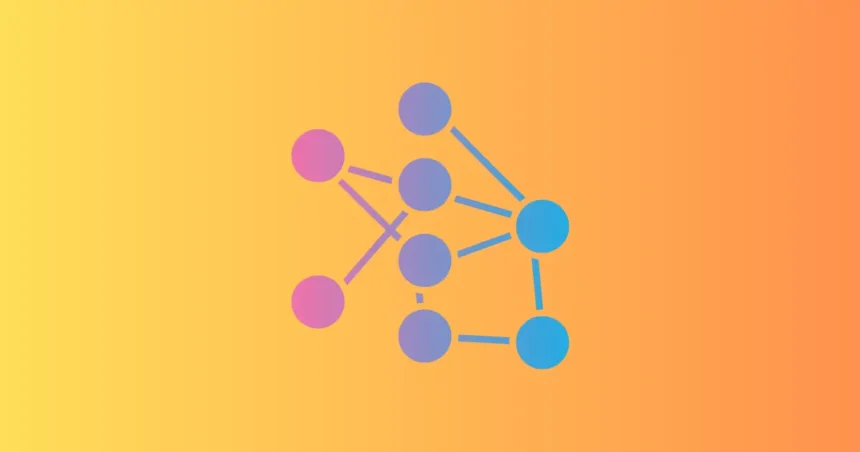
Graph RAG is an approach to retrieval-augmented generation that uses a knowledge graph to represent entities and their relationships alongside or instead of traditional document retrieval.
A conventional RAG system may retrieve several chunks of text that contain relevant keywords. Graph RAG can go a step further by identifying how the information in those chunks is connected.
For example, consider a company database containing information about:
- Employees
- Departments
- Products
- Customers
- Projects
- Locations
- Business relationships
A knowledge graph could represent these connections as:
Employee → works for → Department
Department → manages → Product
Product → purchased by → Customer
When a user asks a complex question, the retrieval system can use these relationships to find related information before giving it to the language model.
In simple terms:
Traditional RAG retrieves relevant information.
Graph RAG retrieves relevant information and relationships between that information.
Why Does Graph RAG Matter?
Large language models are good at generating and reasoning over text, but they do not automatically have access to every piece of private or constantly changing information an organization needs.
RAG addresses this problem by providing external context at query time.
However, many real-world questions are not simply about finding one relevant paragraph. They require connecting multiple facts.
For example:
“Which customers could be affected if Product A is discontinued, and which account managers are responsible for those customers?”
Answering this question may require connecting:
Product → Customers → Accounts → Account Managers
A traditional keyword-based retrieval system may retrieve documents mentioning Product A, customers, and account managers separately. A graph-based approach can explicitly represent and follow those relationships.
How Does Graph RAG Work?
A typical Graph RAG system can be viewed as a pipeline:
Documents and Data → Entity Extraction → Knowledge Graph → User Query → Graph Retrieval → Context → LLM → Answer
Each stage has a specific purpose.
1. Collect Data
The system first gathers information from sources such as:
- PDFs
- Websites
- Databases
- Internal documents
- Product catalogs
- CRM systems
- Research papers
- Support tickets
- APIs
The quality of the underlying data is important because the graph can only be as useful as the information used to create it.
2. Extract Entities
The system identifies important entities within the data.
For example, a document might contain:
“Microsoft launched Azure AI services for enterprise customers.”
The system could identify:
- Microsoft → Organization
- Azure AI → Product or Service
- Enterprise customers → Customer segment
3. Identify Relationships
The next step is identifying relationships between those entities.
For example:
Microsoft → provides → Azure AI
Azure AI → targets → Enterprise Customers
These relationships become edges in the knowledge graph.
4. Build the Knowledge Graph
The extracted entities become nodes, while relationships become edges.
A simplified graph might look like:
Microsoft
↓ provides
Azure AI
↓ used by
Enterprise Customers
This structure gives the retrieval system additional context that may not be obvious from isolated document chunks.
5. Process the User Query
When a user asks a question, the system determines which entities and relationships are relevant.
For example:
“Which Microsoft AI services are used by enterprise customers?”
The system may identify:
- Microsoft
- AI services
- Enterprise customers
It can then search the graph for connections between those entities.
6. Retrieve Relevant Context
The system retrieves relevant graph information and, depending on the architecture, supporting documents or text chunks.
This creates a richer context for the language model.
7. Generate the Answer
The retrieved information is passed to the LLM.
The model then uses that context to generate an answer rather than relying entirely on its pretrained knowledge.
Graph RAG vs Traditional RAG
The biggest difference is how information is represented and retrieved.
| Feature | Traditional RAG | Graph RAG |
|---|---|---|
| Primary structure | Documents and chunks | Entities and relationships |
| Retrieval | Similarity or keyword-based retrieval | Graph relationships plus retrieval |
| Best for | Direct factual questions | Connected and multi-hop questions |
| Context | Text passages | Relationships and supporting context |
| Complexity | Relatively simple | More complex |
| Data preparation | Chunking and embedding | Entity and relationship extraction |
| Example | “What is Product A?” | “Which customers use Product A and which teams support them?” |
Traditional RAG remains highly useful. Graph RAG is not automatically better for every application.
The right choice depends on the type of questions the system needs to answer.
A Practical Graph RAG Example
Imagine a large company wants to build an internal AI assistant for its sales team.
The company has thousands of documents containing:
- Customer information
- Product documentation
- Sales records
- Contracts
- Support information
- Employee information
A salesperson asks:
“Which customers using Product X have open support issues and are managed by our enterprise sales team?”
A simple RAG system might retrieve documents mentioning Product X, support issues, and enterprise customers.
A Graph RAG system could model relationships such as:
Customer → uses → Product X
Customer → has → Support Ticket
Customer → managed by → Sales Representative
Sales Representative → belongs to → Enterprise Sales Team
The retrieval process can follow these connections and collect supporting information before sending the context to the LLM.
This makes Graph RAG particularly useful for questions that require information from multiple connected sources.
A Graph RAG Workflow for an AI Assistant
A practical production workflow could look like this:
User Question
↓
Query Understanding
↓
Entity Identification
↓
Knowledge Graph Search
↓
Related Document Retrieval
↓
Context Assembly
↓
LLM
↓
Grounded Answer
↓
Citation or Source Validation
The graph handles relationships, while traditional retrieval can provide the detailed text needed to support the final response.
This hybrid approach can be more practical than trying to use a knowledge graph for every piece of information.
What Is a Knowledge Graph?
A knowledge graph is a structured representation of entities and the relationships between them.
For example:
Alice → works at → Company A
Company A → owns → Product X
Product X → used by → Customer B
Each entity can be represented as a node, while the relationship between two entities is represented as an edge.
This creates a network of connected information.
Knowledge graphs are useful in Graph RAG because they give the retrieval system an explicit representation of relationships.
How Graph RAG Improves AI Retrieval
1. Better Multi-Hop Retrieval
Some questions require connecting several facts.
For example:
“Which products are affected by suppliers that have contracts expiring this year?”
The answer may require following:
Product → Supplier → Contract → Expiration Date
Graph-based retrieval can help identify this chain.
2. Better Understanding of Relationships
Document retrieval focuses heavily on textual similarity.
Graphs explicitly represent relationships.
This can be valuable when the relationship itself is important to the question.
3. More Useful Context
Instead of giving the LLM several unrelated chunks, the retrieval system can provide connected information.
That can make the retrieved context more meaningful for complex questions.
4. Better Enterprise Search
Businesses often have information spread across multiple systems.
For example:
- CRM
- ERP
- Product database
- Support platform
- Documentation
- HR systems
A knowledge graph can provide a common structure for connecting entities across these sources.
5. Support for Complex Questions
Graph RAG can be particularly useful when users ask questions that require reasoning across multiple entities or sources.
Examples include:
- “Which customers are affected by this product change?”
- “What teams are involved in this project?”
- “Which suppliers are connected to these products?”
- “What research papers cite work from this organization?”
When Should You Use Graph RAG?
Graph RAG is most useful when relationships between information are important to the application.
Consider it when:
- Questions require multiple retrieval steps.
- Information is highly interconnected.
- Users frequently ask relationship-based questions.
- Data comes from several connected sources.
- Traditional RAG retrieves relevant documents but misses important connections.
- The application needs structured reasoning over entities.
You may not need Graph RAG if users mainly ask simple questions such as:
“What is our refund policy?”
A traditional RAG system may be sufficient for that type of query.
Graph RAG vs Vector RAG
Graph RAG and vector-based RAG solve related but different problems.
Vector RAG typically converts documents or chunks into embeddings and retrieves content based on semantic similarity.
Graph RAG introduces structured relationships between entities and can use those relationships during retrieval.
For example:
Vector RAG:
Question → Semantic Search → Relevant Chunks → LLM
Graph RAG:
Question → Entities → Graph Relationships → Related Data/Documents → LLM
Many practical systems can combine both.
A Hybrid Graph RAG Architecture
A production system may use:
User Query
↓
Query Understanding
↓
Vector Search + Graph Search
↓
Result Ranking
↓
Context Assembly
↓
LLM
↓
Answer + Sources
Vector retrieval can find relevant passages, while graph retrieval can identify connected entities and relationships.
The two approaches can complement each other.
Benefits of Graph RAG
More Context-Aware Retrieval
The system can consider relationships rather than treating every document chunk as an isolated piece of information.
Better Multi-Source Reasoning
Graph structures can connect information from different databases, documents, and systems.
Improved Enterprise Knowledge Discovery
Organizations can use graphs to connect customers, products, employees, projects, suppliers, and other business entities.
Greater Transparency
A graph can make relationships explicit, which can help developers inspect how certain pieces of information are connected.
Flexible Retrieval
Graph retrieval and vector retrieval can be combined depending on the question.
Limitations of Graph RAG
Graph RAG also introduces additional engineering challenges.
Higher Complexity
Creating and maintaining a knowledge graph requires more work than building a basic vector-based RAG pipeline.
Data Quality Problems
Incorrect entity extraction or relationships can lead to incorrect retrieval.
Graph Construction Costs
Building a useful graph may require data processing, entity resolution, relationship extraction, and ongoing updates.
Maintenance
The graph must change when the underlying information changes.
Not Necessary for Every RAG Application
If the application only needs straightforward document retrieval, adding a graph may increase complexity without providing enough value.
How to Build a Graph RAG System
A practical implementation can follow these steps.
Step 1: Define the Use Case
Identify the questions your users need to answer.
Do not begin by building a graph simply because Graph RAG is popular.
Step 2: Identify Important Entities
Determine which entities matter to your application.
These could include:
- People
- Companies
- Products
- Documents
- Locations
- Projects
- Events
Step 3: Define Relationships
Determine how those entities connect.
For example:
Customer → purchases → Product
Employee → works on → Project
Company → owns → Product
Step 4: Prepare Your Data
Clean and normalize your source data before creating graph relationships.
Poor-quality source data can produce a poor-quality graph.
Step 5: Build the Graph
Extract entities and relationships and store them in an appropriate graph database or graph structure.
Step 6: Add Retrieval
Connect graph retrieval with your existing RAG pipeline where appropriate.
Step 7: Connect the LLM
Pass the retrieved graph information and supporting documents into the model as context.
Step 8: Evaluate the System
Test whether Graph RAG actually improves the answers compared with your baseline RAG implementation.
How to Evaluate Graph RAG
Evaluation should cover more than whether the final answer sounds good.
Important metrics include:
| Dimension | What to Measure |
|---|---|
| Retrieval quality | Did the system retrieve the right entities and documents? |
| Relationship accuracy | Are the graph connections correct? |
| Answer accuracy | Is the final answer factually correct? |
| Grounding | Is the answer supported by retrieved information? |
| Latency | How quickly does the system respond? |
| Cost | How expensive is each query? |
| Reliability | Does the system behave consistently? |
| User satisfaction | Does the answer actually solve the user’s problem? |
A useful test is to compare:
Baseline RAG vs Graph RAG vs Hybrid RAG
using the same evaluation dataset.
Common Graph RAG Mistakes
Building a Graph Without a Clear Use Case
Not every application benefits from graph-based retrieval.
Ignoring Data Quality
Incorrect entities and relationships can propagate errors throughout the retrieval process.
Making the Graph Too Complicated
Start with the entities and relationships that directly support your use case.
Replacing Vector Search Completely
Graph and vector retrieval can work together. You do not always need to choose only one.
Skipping Evaluation
A graph may make the architecture more sophisticated without improving actual answer quality.
Ignoring Cost and Latency
Additional graph queries, retrieval steps, and model calls can increase operational costs and response times.
Best Practices for Graph RAG
- Start with a specific retrieval problem.
- Build a simple baseline first.
- Identify the entities that matter most.
- Define relationships carefully.
- Keep source data clean and current.
- Combine graph and vector retrieval when appropriate.
- Preserve source information for grounding.
- Test multi-hop questions.
- Measure retrieval quality separately from generation quality.
- Monitor latency and cost after deployment.
- Update the graph when source data changes.
- Define fallback behavior when graph retrieval fails.
Frequently Asked Questions
What is Graph RAG?
Graph RAG is a retrieval-augmented generation approach that uses knowledge graphs to represent and retrieve relationships between entities, often alongside traditional document or vector retrieval.
Is Graph RAG better than traditional RAG?
Not necessarily. Graph RAG can be better for complex, relationship-heavy questions, while traditional RAG can be simpler and more effective for straightforward document-based questions.
What is the difference between Graph RAG and vector RAG?
Vector RAG generally retrieves information based on semantic similarity. Graph RAG uses structured entities and relationships as part of the retrieval process. A system can use both approaches together.
What is a knowledge graph in Graph RAG?
A knowledge graph represents entities as nodes and their relationships as connections or edges. This structure helps retrieval systems understand how pieces of information relate to each other.
When should a company use Graph RAG?
Companies should consider Graph RAG when their users need answers that connect information across multiple entities, documents, databases, or business systems.
Does Graph RAG eliminate hallucinations?
No. Graph RAG can provide better grounding and structured context, but it does not guarantee that an AI model will never generate incorrect information.
Is Graph RAG difficult to implement?
It can be more complex than a basic RAG system because it requires entity extraction, relationship modeling, graph construction, retrieval logic, and ongoing maintenance.
Key Takeaways
- Graph RAG combines RAG with knowledge graphs.
- Knowledge graphs represent entities and relationships.
- Graph retrieval can help with complex, multi-hop questions.
- Traditional RAG remains useful for straightforward document retrieval.
- Graph and vector retrieval can be combined in a hybrid architecture.
- Graph quality depends heavily on the quality of the underlying data.
- Graph RAG adds complexity, cost, and maintenance requirements.
- Always compare Graph RAG against a simpler baseline before adopting it.
Conclusion
Graph RAG adds a relationship-aware layer to retrieval-augmented generation. Instead of treating information as isolated document chunks, it can represent how entities, documents, products, people, organizations, and events are connected.
This makes it particularly useful for applications where users ask questions that require information from multiple sources or several connected facts.
However, Graph RAG is not a replacement for traditional RAG in every situation. The best architecture depends on the application’s data, query patterns, accuracy requirements, latency constraints, and budget.
For many enterprise AI applications, a hybrid approach combining knowledge graphs, vector retrieval, and LLMs can provide a practical balance between structured relationships and natural-language information retrieval.

AiVoogle – AI Tutorials & AI Tools
AiVoogle is an AI-focused platform sharing practical AI tutorials, AI tools, guides, reviews, and the latest trends in artificial intelligence. Our goal is to make AI simple, useful, and accessible for everyone—from beginners and creators to marketers, developers, and businesses.
The AiVoogle team researches and covers the latest AI tools and technologies to help readers discover the right tools and learn how to use AI effectively.
Focus: AI Tutorials | AI Tools | AI Guides | AI News | AI Reviews